Version 1.3

Download Switch Power Scheme

Pick the binary that matches your architecture, keep the folder portable, and verify integrity with the published hashes before you execute anything.

Each download button opens a fresh secure link to the official package host. Reload the page to generate new URLs.

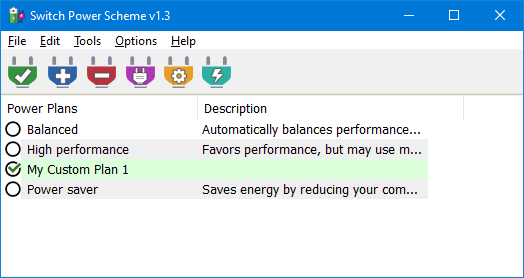
Switch Power Scheme interface reference
Release focus
11 July 2021 maintenance build
Packaging
ZIP archive, portable layout
Binaries
sPowers_x64.exe, sPowers.exe
Approximate footprint
About 900 KB archive class

Source transparency

Switch Power Scheme ships as a compiled Windows utility inside a documented ZIP. Transparency here means publishing hashes, describing behaviors, and steering advanced users toward local verification utilities already present on Windows such as CertUtil.

When you add your definitive download location, mirror the same hash table so visitors can detect truncated uploads or stale caching layers.

SHA and signature explanation

MD5 and SHA1 fingerprints identify a precise file byte stream. After you download, run certutil -hashfile .\sPowers_x64.exe SHA1 and compare the output to the reference below.

sPowers_x64.exe

MD5: 8070124a0301d81c5b48e421a9626536

SHA1: 05c262ab85dd4c625eab23f1955872ad81cc0cfe

sPowers.exe

MD5: b4802866d0f389fb380c8f5492fe7a55

SHA1: 7dcedb59666d039c1c78f54fdf6647c20ed78357

Antivirus false positive clarification

Portable tray utilities that touch power settings sometimes trigger heuristic detections. A flag from one engine is not automatic proof of harm. Pause, compare hashes, rescans after extraction, and prefer enterprise tools that expose reasoning text.

Security and integrity checklist

  1. Download only from the destination URLs you personally trust once they are configured on the buttons above.
  2. Verify SHA1 or MD5 before running, especially on domain joined machines with strict compliance rules.
  3. Unpack with a tool that preserves Zone.Identifier metadata so security teams can trace origin.
  4. Run the first launch from a standard user, then elevate only when enabling desktop context integration.
  5. Document the version string during change windows so support can reproduce issues accurately.

Language

Switch Power Scheme

pcoptimizer.org

Software names and trademarks belong to their owners. This site describes the Switch Power Scheme utility for Windows power plan management.

Support

Legal

Use on systems you own or are authorized to administer. Validate downloads locally. No warranty is implied.

Copyright 2026 pcoptimizer.org. All rights reserved.
Download